maintenant
The all-in-one monitoring dashboard your self-hosted stack deserves.
Drop a single container. Watch everything. Sleep at night.
Try the live demo: a Pro instance monitoring a real stack, read-only. Nothing to install, nothing to sign up for.
What is maintenant?
Most self-hosters juggle 3-5 tools to monitor their stack: one for containers, one for uptime, one for certs, one for metrics, and yet another for a status page. maintenant replaces all of them with a single binary and nothing to install on the datastore layer: no Redis, no message queue, just SQLite, and no configuration to get started. A fleet operator who already runs PostgreSQL can point the server at it so the instance stops being tied to its machine, but nothing requires it. The container runtime (Docker socket or Kubernetes API) is optional: endpoint, SSL, and heartbeat monitors work fully without it.
Deploy one container, and maintenant auto-discovers your entire stack. Docker or Kubernetes, it does not matter.
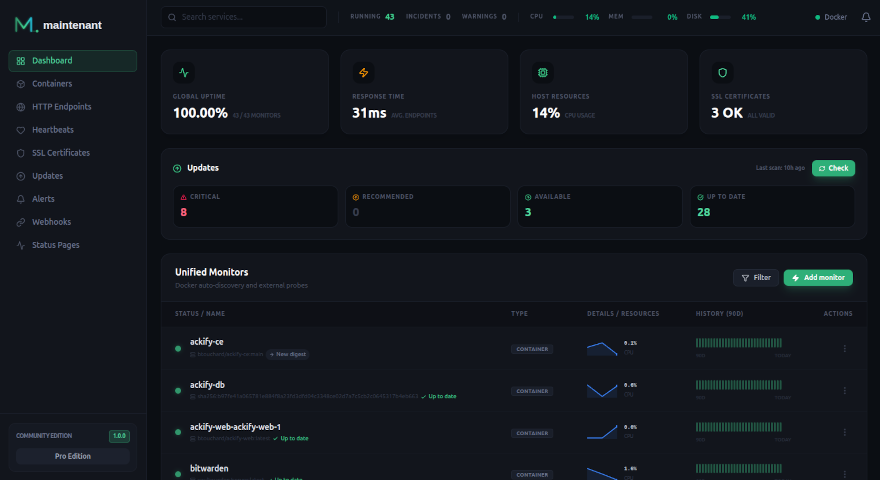
Key Features
- Container Monitoring — Zero-config auto-discovery for Docker and Kubernetes. State tracking, health checks, restart loop detection, an opt-in alert for containers that stay stopped, log streaming.
- Multi-Host Monitoring — Monitor many hosts from one central server. Lightweight agents stream container state, endpoints, certificates and per-host resource metrics over gRPC with TLS, each agent authenticating with its own key after a one-time enrollment. An agent keeps its events in a local spool while the server is unreachable and replays them into the history when it reconnects. Personal (up to 20 hosts) or Pro (unlimited).
- Docker Swarm Monitoring — Automatic Swarm service discovery, stack grouping, node health, crash-loop detection, rolling update tracking. Available in every edition.
- Endpoint Monitoring — HTTP and TCP checks defined as Docker labels, derived from Traefik and Caddy labels, or created by hand. Response times, daily uptime history kept for up to 365 days, sparklines.
- Heartbeat & Cron Monitoring — Create a monitor, get a URL, curl from your cron job. Tracks durations, exit codes, missed deadlines. Outbound heartbeats let a second instance watch this one.
- TLS Certificate Monitoring — Auto-detection from HTTPS endpoints. Alerts at 30, 14, 7, 3, and 1 day before expiry. Full chain validation.
- Resource Metrics — CPU, memory, network I/O, disk I/O per container. Historical charts (7 days in Community, 30 in Personal, 90 in Pro), alert thresholds, top consumers view.
- Update Intelligence — OCI registry scanning with digest comparison for floating tags. Know when your images have updates available, with update and rollback commands for Compose, plain Docker, Swarm and Kubernetes. CVE enrichment, changelogs and risk scores with Personal.
- Host OS End-of-Support — Tracks Debian, Ubuntu, RHEL, Rocky, Alma, Alpine and SLES support cycles. Warns 30 days before a host's security support ends, critical once it has.
- Network Security Insights — Automatic detection of exposed ports, dangerous network configurations, and privileged containers. With Personal: CVE ecosystem mapping via OCI manifest inspection, risk scoring and a security posture dashboard.
- Alert Engine — Unified alerts across all sources. Channels silent by default, routed via Alert Triggers. Webhook and Discord channels, plus email and Telegram with Personal. Silence rules, three delivery attempts per notification. Slack, Teams and multi-level escalation policies with Pro.
- Public Status Page — Component groups, live SSE updates. Incident management with Personal. Maintenance windows, subscriber notifications and branding with Pro.
- MCP Server — Expose monitoring data to AI assistants (Claude Code, Cursor) via the Model Context Protocol. 51 tools across monitoring, security, Kubernetes, Swarm and alert routing; stdio and HTTP transports.
Comparison
| maintenant | Uptime Kuma | Portainer | Dozzle | |
|---|---|---|---|---|
| Container auto-discovery | Yes | No | Yes | Yes |
| HTTP/TCP endpoint checks | Yes | Yes | No | No |
| Cron/heartbeat monitoring | Yes | Yes | No | No |
| SSL certificate tracking | Yes | Yes | No | No |
| CPU/memory/network metrics | Yes | No | Limited | No |
| Image update detection | Yes | No | Yes | No |
| Network security insights | Yes | No | No | No |
| Public status page | Yes | Yes | No | No |
| Alerting (webhook, Discord, email, Telegram, Slack, Teams) | Yes | Yes | Limited | No |
| Docker Swarm monitoring | Yes | No | Limited | No |
| Kubernetes native | Yes | No | Yes | No |
| MCP for AI assistants | Yes | No | No | No |
| Single binary, zero deps | Yes | Node.js | Docker API | Docker API |
| Container runtime optional | Yes | No | No | No |
Editions and license
The core of maintenant is licensed under Apache 2.0 and needs no key: it is the Community edition, free for any use. The paid features live in internal/commercial and frontend/src/commercial under a commercial license, and a license key opens them. Both parts ship in the same binary.
| Edition | For | Adds |
|---|---|---|
| Community | Everyone, free | Containers, endpoints, heartbeats, certificates, the status page, alerts with Discord and webhook channels, the Swarm and Kubernetes views, 7 days of resource history, on a single host, with caps on hand-made monitors (10 endpoints, 5 heartbeats, 5 certificate monitors, 3 status components). |
| Personal | One person, on their own infrastructure, freelancers included | No caps, up to 20 remote hosts, email and Telegram alerts, CVE enrichment, risk scoring, security posture, incidents, changelog, 30 days of resource history, advanced trigger filters, OCSP stapling. Bought once, it never expires and includes a year of updates. |
| Pro | Teams, and anyone running it for others | Everything in Personal with unlimited hosts, Slack and Teams, escalation policies, maintenance windows, status page subscribers and branding, 90 days of resource history, and support. Subscription. |
Prices and terms are in COMMERCIAL-LICENSE.md. The Configuration page explains how a license key is verified and what happens offline, and what happens when the edition drops.
Quick Start
Get maintenant running in 30 seconds:
# docker-compose.yml
services:
  maintenant:
    image: ghcr.io/kolapsis/maintenant:latest
    ports:
      - "8080:8080"
    read_only: true
    security_opt:
      - no-new-privileges:true
    tmpfs:
      - /tmp:noexec,nosuid,size=64m
    volumes:
      - /var/run/docker.sock:/var/run/docker.sock:ro
      - /proc:/host/proc:ro
      - /etc/os-release:/host/etc/os-release:ro
      - maintenant-data:/data
    environment:
      MAINTENANT_ADDR: "0.0.0.0:8080"
      MAINTENANT_DB: "/data/maintenant.db"
    restart: unless-stopped

volumes:
  maintenant-data:
Open http://localhost:8080: your containers are already there. No configuration needed.
Read this before exposing it
maintenant has no built-in authentication: anyone who can reach the port can read everything and change monitors and settings. "8080:8080" publishes the port on every interface of the host. To keep it local, publish "127.0.0.1:8080:8080" and put a reverse proxy with authentication in front, see Security.
The Docker socket is mounted read-only, but :ro does not stop Docker API writes: the container can control the host's Docker. For production, run maintenant behind a docker-socket-proxy instead.
For detailed installation instructions, see Installation.