Container Monitoring
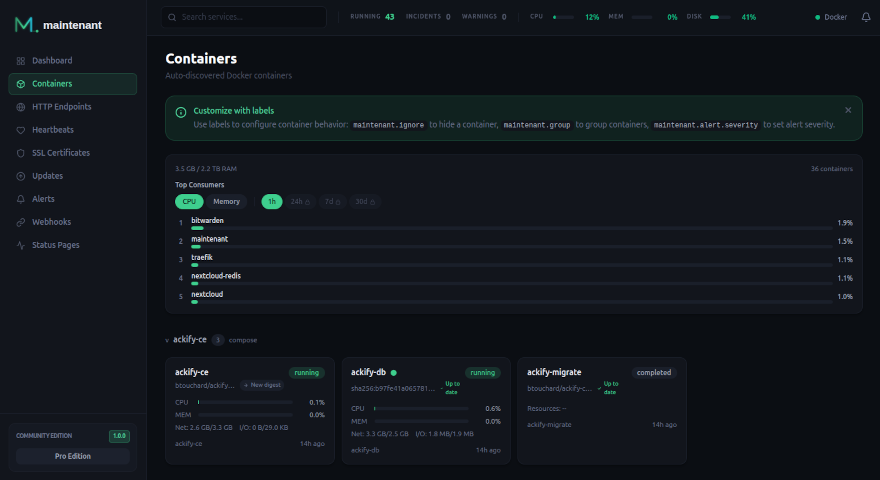
Zero-config auto-discovery for Docker and Kubernetes. Every container is tracked the moment it starts, and containers that are already stopped are listed too. The container runtime is optional: endpoint, SSL certificate, and heartbeat monitors continue working fully even without it.
How It Works
maintenant connects to your container runtime (Docker socket or Kubernetes API) and watches for container lifecycle events in real time. There is nothing to configure: every container is discovered automatically.
If the runtime is unreachable at startup, maintenant enters degraded mode: it starts normally, all non-container monitors remain fully operational, and container monitoring resumes automatically once the runtime becomes available, with no restart required.
When a new container starts, maintenant immediately begins tracking:
- State changes:
running,exited,completed,restarting,paused,createdordead, with exit codes - Health checks: Docker
HEALTHCHECKstatus (healthy, unhealthy, starting) - Restart loops: detection and alerting when a container keeps coming back up after crashing
- Uptime: how much of each day the container was running
| State | Meaning |
|---|---|
running |
The container is up. |
exited |
The container stopped with an exit code other than 0, 137 or 143, or with 137 after the out-of-memory killer stopped it. |
completed |
The container stopped with exit code 0, 143 (SIGTERM) or 137 (SIGKILL, what docker stop falls back to) unless the out-of-memory killer sent the 137: a normal end, not a crash. |
restarting |
The runtime reports the container as restarting. |
paused |
The container is paused. |
created |
The container exists but never started. |
dead |
The runtime gave up on the container. |
All state transitions are persisted in the database and pushed to the browser via SSE in real time. Raw transitions are kept for 90 days (the latest one of each container is always kept), and the daily uptime computed from them is kept for 365 days.
A container that exits with 137 is inspected to tell an out-of-memory kill from a stop: maintenant reads the OOMKilled flag of the container, on the server's own runtime and on agents.
When a local container dies, the last 50 lines of its logs are stored with the transition, so you can see why it stopped after the container is gone.
A container that is destroyed, or that the runtime no longer lists, is archived: it leaves the container list (?archived=true brings it back) and is deleted after 30 days.
Auto-Discovery
maintenant connects to the Docker daemon via the socket (/var/run/docker.sock). Mount it as read-only:
volumes:
  - /var/run/docker.sock:/var/run/docker.sock:ro
  - /proc:/host/proc:ro
  - /etc/os-release:/host/etc/os-release:ro
Every container is discovered automatically, running or not. New containers are picked up the moment they start. maintenant never modifies your containers: it is strictly read-only.
Containers created by docker compose run (Compose one-off containers, labelled com.docker.compose.oneoff=True) are skipped entirely: they carry the labels of the service they were run from, and monitoring them would create a duplicate of that service.
When the image carries OCI labels (org.opencontainers.image.version, source, url, description), the container detail panel shows its version, description, and links to the source repository and documentation. The older org.label-schema.* labels are read as a fallback, and org.opencontainers.image.documentation is used when no URL label is set. See Image metadata.
On Docker Swarm, the deploy.labels of a service are read too, under the labels of the container itself.
maintenant uses the in-cluster Kubernetes API with a read-only ServiceAccount, or the cluster of a kubeconfig (KUBECONFIG, else ~/.kube/config) when it runs outside one. It lists and watches:
- Deployments: rollout status, replica counts
- StatefulSets: ordered pod management
- DaemonSets: node-level workloads
- Pods with no controller: bare pods are listed on their own, while pods owned by a controller roll up into their workload
Each workload gets one of the states above:
| Workload | State |
|---|---|
| Deployment | running when all desired replicas are ready, or when at least one is (error_detail then reads partial: n/m ready), exited on ProgressDeadlineExceeded, completed when scaled to 0, created otherwise |
| StatefulSet, DaemonSet | created until a pod is ready, running after |
| Bare pod | running, restarting (CrashLoopBackOff), created (pending or image pull errors), exited (failed or OOMKilled), completed (succeeded) |
Workloads carry ready and desired pod counts instead of a Docker health status. See the Kubernetes Guide for RBAC setup.
Grouping
Containers are automatically grouped for easy navigation.
- Compose projects: containers from the same
docker-compose.ymlare grouped by project name. On Swarm, containers that Compose did not start are grouped by stack (com.docker.stack.namespace). - Custom groups: override with the
maintenant.grouplabel:
Containers with neither show up under Ungrouped.
Workloads are grouped by namespace.
Health Checks
maintenant reads Docker HEALTHCHECK results automatically. No configuration needed: if your container defines a health check, maintenant tracks it.
Health states:
| State | Description |
|---|---|
healthy |
Health check passing |
unhealthy |
Health check failing |
starting |
Container just started, health check not yet run |
| none | No health check defined: the API returns health_status: null and has_health_check: false |
When a container goes from healthy to unhealthy, maintenant raises a health_unhealthy alert at Warning severity through the Alert Engine, and resolves it when the container is healthy again. A container that never became healthy (starting to unhealthy) does not raise it, and maintenant.alert.severity does not change its severity. The alert is named after the container, and so is the container.health_changed event, which carries id, container_name, health_status, previous_health, timestamp and agent_id.
Restart Loop Detection
maintenant counts how many times a container came back to running after being exited or restarting during the last 10 minutes. When that count reaches the restart threshold, a restart_loop alert is raised.
- Threshold: 3 restarts by default. Set it per container with
maintenant.alert.restart_threshold(a positive integer; anything else is ignored). - Severity: Warning. The alert escalates in place to Critical when the count reaches three times the threshold (9 restarts with the default).
maintenant.alert.severityhas no effect on it. - Not counted: restarts that follow a
completedstate, such asdocker restartor a clean stop followed by a start. Only crashes count. - Resolution: automatic. A start that finds the count below the threshold resolves the alert, and while the alert is open maintenant re-checks the running container every minute, so it resolves on its own once the 10-minute window no longer holds enough restarts. A container that is stopped or archived is not re-checked.
The SSE event container.restart_alert carries container_id, container_name, restart_count, threshold and agent_id. container.restart_recovery is sent when the count falls back under the threshold.
Stopped containers
A container that stops and stays stopped raises no restart alert. Set MAINTENANT_CONTAINER_DOWN_AFTER to a Go duration such as 5m and a container_down alert fires for any container, on the server or on an agent, that stays exited or dead for that long, at the severity of the container's maintenant.alert.severity (Warning by default). It resolves when the container runs again. Without the variable, or with 0, the alert does not exist, and a value that is not a duration stops maintenant at startup. A completed container is not down. See Alert Engine.
Log Streaming
maintenant provides real-time log streaming, with stdout and stderr interleaved in a single stream. Logs are streamed directly from the container runtime: they are not stored in maintenant's database, except for the snippet kept when a container dies (see How It Works).
Access logs via the API:
GET /api/v1/containers/{id}/logs: fetch recent logs.linesdefaults to 100 and is capped at 500,timestamps=trueprefixes each line with its time.GET /api/v1/containers/{id}/logs/stream: SSE stream of live logs. It emitscontainer.log_lineevents, then a finalcontainer.log_errorevent when the container stops, and a keep-alive comment every 25 seconds.linessets the initial backlog (default 100, maximum 500). On Kubernetes,containerselects a container of the pod. While the server's own runtime is disconnected, it answers503 RUNTIME_UNAVAILABLE, likelogs.
Containers of a remote agent are read through that agent, whatever the state of the server's own runtime. A tail waits at most 15 seconds, and an agent serves four live streams at a time. The API answers AGENT_OFFLINE (503), AGENT_TOO_OLD (501), LOGS_BUSY (429) or LOGS_TIMEOUT (504) when it cannot.
Excluding Containers
To exclude a container from maintenant monitoring:
true and 1 are accepted, as a Docker or Swarm service label or as a Kubernetes annotation. This is useful for infrastructure containers (reverse proxies, sidecars) that add noise to your dashboard.
An ignored container is still known to maintenant but is left alone:
- it is hidden from the container list and the dashboard,
- the state and health events of the runtime are not recorded, and no
container.state_changedorcontainer.discoveredevent is sent over SSE or webhooks, - it raises no alert (restart loop, health, container down),
- it gets no security insight and no resource sample,
- it is left out of update checks,
- the endpoint and certificate monitors that its labels would create are not created.
Settings read from labels and annotations (ignore, group, severity, restart threshold) are refreshed when maintenant reconciles with the runtime: at startup, after a reconnection, and when a new container starts. After changing a label on an existing Swarm service or Kubernetes workload, restart maintenant to apply it without waiting. The Kubernetes alerts (crash loop, replicas) are the exception: they read the maintenant.ignore annotation again every 30 seconds.
Uptime
The container detail panel shows a 90-day bar: for each day, the share of time the container was running and not unhealthy. The API serves up to 365 days:
The response carries monitor_id, monitor_type (container) and a days array with one entry per UTC day, most recent first, each with date, uptime_percent (null for a day maintenant has no data for) and incident_count (transitions from up to not up). days defaults to 90 and is capped at 365. The state timeline is available at GET /api/v1/containers/{id}/transitions.
GET /api/v1/containers/{id} also returns an uptime object with the percentage over 24 hours and over longer windows, limited by the history window of the edition:
| Edition | Keys of uptime |
|---|---|
| Community | 24h, 7d |
| Personal | 24h, 7d, 30d |
| Pro | 24h, 7d, 30d, 90d |
Completed days are aggregated once a day ends, so the history outlives the raw transitions. A day past the raw retention that was never aggregated has no value, and an archived container has no value after its archival.
Security Insights
Each container's detail panel displays network security insights detected by maintenant's analyzer. These include exposed ports binding to 0.0.0.0, database ports without restriction, host-network mode, and privileged containers. For Kubernetes workloads, the insights come from the LoadBalancer and NodePort Services that expose them.
See Network Security Insights for full details.
Degraded Mode
If the container runtime (Docker socket or Kubernetes API) is unavailable when maintenant starts, or becomes unavailable while running, container monitoring enters degraded mode:
- The app starts and serves the full UI and API normally.
- Endpoint, SSL certificate, and heartbeat monitors are unaffected: they continue checking and alerting as usual.
- Container list and detail pages show last-known data (marked as stale) so history is preserved.
- Live operations (log streaming, real-time stats) return a clear error instead of crashing:
logsandlogs/streamanswer503 RUNTIME_UNAVAILABLEwith the standard error body. - A non-blocking banner appears on the Containers and Dashboard pages, and a RUNTIME OFFLINE banner at the top of every page.
- The runtime availability is exposed on
GET /api/v1/health(runtime.connected: false) and broadcast in real time with theruntime.availability_changedSSE event when the state changes. The interface follows that event, so the banner appears and disappears without a reload.
Automatic recovery: maintenant retries the runtime connection in the background. Each failed attempt is logged with its cause (error) and the delay before the next one (retry_in), which starts at 1 second and doubles up to 30 seconds. When the runtime becomes reachable again, container monitoring resumes (reconciliation runs, the event stream restarts, and the banner disappears), all without a restart.
On Kubernetes the runtime retries indefinitely with a backoff, and it is considered lost after about 45 seconds without an answer from the API server (three missed probes, 15 seconds apart). The events of Deployments, StatefulSets, DaemonSets and bare pods are read live from the API server. When maintenant starts outside a cluster with a kubeconfig whose cluster does not answer, it falls back to Docker and logs a warning, unless MAINTENANT_RUNTIME=kubernetes makes it wait for that cluster. In a cluster, it never falls back.
This makes it safe to run maintenant without mounting the Docker socket, or to temporarily stop Docker during a host maintenance window while keeping all other monitors active.
Related
- Docker Labels Reference: full list of container labels
- Alert Engine: configure alerts for container events
- Resource Metrics: CPU, memory, and network metrics per container
- Network Security Insights: port exposure and network misconfiguration detection