Public Status Page
Give your users a clean status page. Incident management with timeline updates, scheduled maintenance windows, email subscriptions.


How It Works
maintenant serves the public status page through the same Vue SPA as the admin UI. The page loads its content from /status/api, follows changes through an SSE stream (/status/events), and reads its look from a settings document (/status/settings.json) that is served with a 30-second cache.
The status page displays:
- Component status: operational, degraded, partial outage, major outage, under maintenance
- Active incidents: current issues with their latest update
- Scheduled maintenance: the next five planned downtime windows that have not started yet
- Subscription form: only when email subscriptions are open (see Subscriber Notifications)
What each edition opens:
| Capability | Community | Personal | Pro |
|---|---|---|---|
| Components | up to 3 | unlimited | unlimited |
Automatic incidents (auto_incident) |
yes | yes | yes |
| Manual incidents and timeline updates | — | yes | yes |
| Maintenance windows | — | — | yes |
| Email subscribers | — | — | yes |
| Personalization (branding, FAQ, footer) | — | — | yes |
Reading incidents and maintenance windows through the API is open in every edition; only creating, changing and deleting them is gated. Below the required edition those calls return 403 EDITION_REQUIRED; creating a fourth component in Community returns 403 QUOTA_EXCEEDED. GET /api/v1/edition reports the current count and the limit under quotas.status_components.
Status URL
The status page can be reached two ways:
| Mode | URL the visitor sees | When to use |
|---|---|---|
| Same domain (default) | https://app.example.com/status |
Simplest setup, no extra DNS or proxy work. |
| Dedicated subdomain | https://status.example.com/ |
Cleaner public-facing URL, easier to keep behind a separate auth bypass, recommended for production. |
Set MAINTENANT_STATUS_URL to the canonical public URL of the status page. It sets the View public status page link in /status-admin, which the frontend reads from GET /api/v1/edition as status_url, and the links of the Atom feed. When it is unset, the admin link is the relative path /status on the host that serves the admin UI, and the feed links use MAINTENANT_BASE_URL followed by /status.
Subdomain deployment
When serving the status page from its own subdomain, point the subdomain at the same backend container as the main app and set MAINTENANT_STATUS_URL to it. On that host, maintenant serves the status page at / itself, so the browser URL stays clean (status.example.com/), and the Vue router only registers the public page: the dashboard cannot be reached from the subdomain.
The server also answers 404 to every other path on that host: /api/, /mcp, /oauth/ and the dashboard pages are refused even if the proxy forwards them. Route only the public paths to the backend anyway:
Traefik example:
# Main app on app.example.com
traefik.http.routers.maintenant.rule: "Host(`app.example.com`)"
traefik.http.routers.maintenant.middlewares: "authelia@docker"

# Public status page on status.example.com (no auth, public paths only)
traefik.http.routers.maintenant-status.rule: "Host(`status.example.com`) && (Path(`/`) || PathPrefix(`/status`) || PathPrefix(`/assets/`) || Path(`/manifest.webmanifest`) || Path(`/sw.js`) || Path(`/registerSW.js`) || PathRegexp(`^/workbox-`) || PathRegexp(`^/(favicon|icon|apple-touch-icon|logo)`))"

# Optional: rewrite / to /status/ at the proxy (maintenant already serves / as the status page on that host)
traefik.http.routers.maintenant-status.middlewares: "status-rewrite@docker"
traefik.http.middlewares.status-rewrite.replacepathregex.regex: "^/$"
traefik.http.middlewares.status-rewrite.replacepathregex.replacement: "/status/"
If you keep a rewrite, use replacepathregex (only rewriting / to /status/), not addprefix=/status: the latter would also prepend /status to SPA asset paths (/assets/...) and SSE endpoints (/status/events), causing 404s. All other paths (/assets/..., /status/api, /status/events, /status/settings.json) must pass through unchanged.
Set the matching env var on the backend:
Components
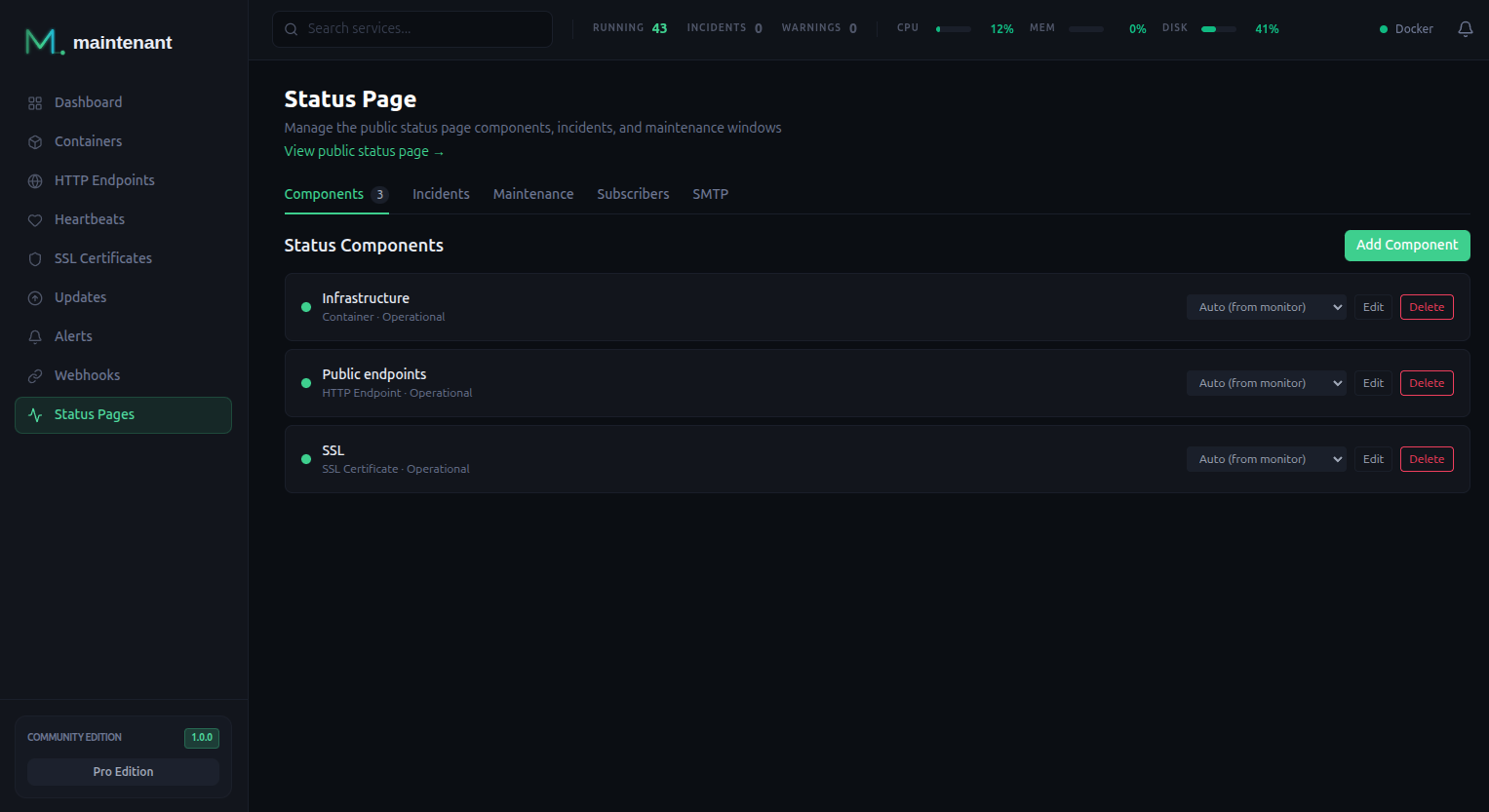
Link monitored resources to status page components. A component is either an explicit list of monitors or every monitor of one type (match-all).
# A component made of two explicit monitors
POST /api/v1/status/components
{
  "display_name": "API",
  "composition_mode": "explicit",
  "monitors": [
    { "type": "container", "id": "0195f3c2-7b1e-7c3a-9d2e-5a4f8e1b6c70" },
    { "type": "endpoint",  "id": "0195f3c4-11aa-7f00-8c55-2b9d0e3a4c18", "label": "Public API" }
  ],
  "display_order": 1,
  "visible": true,
  "auto_incident": false
}

# A component that follows every endpoint
POST /api/v1/status/components
{
  "display_name": "All endpoints",
  "composition_mode": "match-all",
  "match_all_type": "endpoint"
}
| Field | Meaning |
|---|---|
display_name |
Name shown on the page. Required. |
composition_mode |
explicit (default) or match-all. Fixed once the component exists. |
monitors |
Explicit mode only, at least one entry. Each entry is {type, id, label} where id is the UUID of the monitor. label is optional: plain text, 80 characters at most, without control characters (line breaks, tabs), trimmed. The public page shows it instead of the type name. A label outside this rule is refused with 400 validation. |
match_all_type |
Match-all mode only: container, endpoint, heartbeat or certificate. Fixed once the component exists. |
display_order |
Sort position on the page. |
visible |
false hides the component from the public page and from the global status. A hidden component is never named on a public surface: not in /status/api, not in the /status/events stream, not in subscriber emails, and it never opens an automatic incident. Default true. |
auto_incident |
Open and resolve incidents automatically, see Automatic Incidents. |
status_override |
Update only. Forces a status (see Status Values); an empty string goes back to the status derived from the monitors. |
An explicit component without monitors is flagged as needing attention and stays off the public page. In Community, creating a fourth component returns 403 QUOTA_EXCEEDED.
Supported monitor types:
| Type | Source |
|---|---|
container |
Container state and health |
endpoint |
HTTP/TCP check status |
heartbeat |
Heartbeat ping status |
certificate |
TLS certificate validity |
How a component status is derived
Each monitor is first mapped to a status:
| Monitor | Operational | Degraded | Major Outage |
|---|---|---|---|
| Container | running and not unhealthy, or completed |
running but unhealthy |
any other state (exited, restarting, paused, created, dead) |
| Endpoint | up, or not checked yet |
degraded (served over a certificate that is not trusted) |
down |
| Heartbeat | up |
new, started, paused |
down |
| Certificate | valid |
expiring |
expired, error, unknown |
A monitor that no longer exists counts as operational.
A component with several monitors (or a match-all component) combines them:
| Monitors | Component status |
|---|---|
| All operational, or none | Operational |
| At least one degraded, none in major outage | Degraded |
| Some in major outage, not all | Partial Outage |
| All in major outage | Major Outage |
A status override replaces the derived status. The global status of the page is the worst status among visible components, ranked Major Outage, Under Maintenance, Partial Outage, Degraded.
Status Values
| Status | Meaning |
|---|---|
operational |
Everything working normally |
degraded |
Service is slow or partially impaired |
partial_outage |
Some functionality unavailable |
major_outage |
Service is down |
under_maintenance |
Planned maintenance in progress |
The global banner reads All Systems Operational, Degraded Performance, Partial System Outage, Major System Outage or Scheduled Maintenance.
status_override accepts only these five values (or an empty string to clear it). An incident severity must be minor, major or critical, and an incident status investigating, identified, monitoring or resolved. Any other value is refused with 400 validation.
Public Access
The status page is designed to be publicly accessible without authentication. Configure your reverse proxy to allow unauthenticated access to:
/status/: the page itself (or the subdomain root if you use a dedicated status host)/status/api: the JSON payload backing the page/status/events: the real-time SSE stream/status/settings.json: the personalization document/status/feed.atom: Atom feed of the ongoing incidents and those resolved in the last 30 days/status/subscribe,/status/confirm,/status/unsubscribe: email subscriptions/assets/*: the JavaScript and CSS of the SPA, which the page needs when it shares a host with a protected dashboard
Reverse proxy configuration
See the Security Guide → Public Routes for the full list of routes that must bypass authentication, and worked examples for Traefik, Caddy, and nginx.
The status page is a responsive Vue SPA with live SSE updates. It can be embedded in a frame on any site, and /status/api and /status/settings.json answer cross-origin requests (Access-Control-Allow-Origin: *). Every public route is rate limited to 10 requests per second per client address, and a request body is capped at 4 KiB. A demo build is read-only: the admin calls that write and POST /status/subscribe answer 403 DEMO_MODE.
/status/events
As soon as a client connects, the stream sends its headers and a : ping comment, so a proxy sees it open before the first event. The stream carries these events. They are also sent on the admin stream /api/v1/containers/events, which is how /status-admin stays current.
| Event | Payload | Sent when |
|---|---|---|
status.component_changed |
component_id, name, status, monitors |
A monitor linked to the component changes (container state or health, endpoint status, heartbeat or certificate alert). On the public stream each monitor is {type, status, label}, without its id or name; the admin stream keeps {type, id, name, label, status}. Not sent on the public stream for a hidden component |
status.global_changed |
status, message |
After every component change, creation, edit or deletion |
status.component_created, status.component_updated, status.component_deleted |
component_id |
A component is created, edited or deleted. The public page receives it only when the component is or was visible |
status.incident_created |
id, title, severity, status, components |
An incident is opened. components lists only the visible components; the dashboard stream gets the full list |
status.incident_updated |
id, status, message |
A timeline entry is added |
status.incident_resolved |
id, title |
An incident is resolved |
status.maintenance_started, status.maintenance_ended |
id, title, components |
A maintenance window starts or ends. components lists only the visible components on the public page |
The page updates in place: status.component_changed and status.global_changed change the displayed status without a request, and every other event makes it reload /status/api. The stream sends a keep-alive comment every 25 seconds so that a reverse proxy does not close an idle connection.
/status/api
{
  "global_status": "degraded",
  "global_message": "Degraded Performance",
  "updated_at": "2026-03-10T14:02:11Z",
  "components": [{
    "id": "…", "name": "API", "status": "degraded",
    "monitors": [{ "type": "endpoint", "status": "degraded", "label": "Public API" }]
  }],
  "active_incidents": [{
    "id": "…", "title": "API latency increase", "severity": "minor",
    "status": "investigating", "components": ["API"],
    "created_at": "2026-03-10T13:58:00Z",
    "latest_update": { "status": "investigating", "message": "…", "created_at": "…" }
  }],
  "upcoming_maintenance": [],
  "personalization_version": 4,
  "subscriptions_enabled": true
}
monitors is the per-monitor breakdown of each component, in the same public form as the status.component_changed event, so a reload keeps it. Each monitor is {type, status, label}, and label is omitted when none is set. The id and the name (the target, such as a URL or a host) of a monitor never appear on a public surface; the page names a monitor by its label, or by its type when it has none. Incidents and maintenance windows name only the visible components. subscriptions_enabled is true only when email subscriptions are open. The page shows its Subscribe to updates form only in that case. personalization_version is omitted when no personalization has been saved.
/status/feed.atom
An Atom feed of the ongoing incidents and of those resolved in the last 30 days, the most recently changed first. Each entry is titled [<severity>] <title> and summarizes the incident with its latest update message. The links and entry ids are built from MAINTENANT_STATUS_URL, or from MAINTENANT_BASE_URL followed by /status when it is unset, never from the request host. The feed may be cached for 60 seconds.
Automatic Incidents
A component with auto_incident: true opens incidents by itself from alerts, in every edition, as long as it is visible: a hidden component opens and updates no incident, although an incident opened while it was visible still resolves. Every alert event about one of the component's monitors (or about any monitor of the type, for a match-all component) is handled like this:
- A problem alert while the component is not operational opens an incident titled
<component name> - <alert message>, statusinvestigating, with severitycriticalfor a critical alert,majorfor a warning andminorotherwise. If an incident is already open for the component, the alert message is added to its timeline instead. - A recovery while the component is operational again adds a
resolvedupdate, "Auto-resolved: all monitors operational". - A component with a status override is left alone, which includes every component under an active maintenance window.
Opening an incident and resolving it are announced on the SSE stream and emailed to subscribers. The timeline entries added to an open incident are pushed on the SSE stream only.
Incident Management 
Track and communicate incidents with timeline updates. Each incident has a severity (minor, major, critical), a status, the components it affects, and a history of updates visible on the public status page.
# Create an incident
POST /api/v1/status/incidents
{
  "title": "API latency increase",
  "severity": "minor",
  "component_ids": ["0195f3c6-2d4e-7a10-b3c9-6e1f0a8d5b22"],
  "message": "Investigating elevated response times on the API."
}

# Post a timeline update
POST /api/v1/status/incidents/{id}/updates
{
  "status": "identified",
  "message": "Root cause identified. Deploying fix."
}
title and severity are required on creation. The optional status sets the initial status and defaults to investigating. An update requires both status and message, and sets the status of the incident. The admin UI offers investigating, identified, monitoring and resolved; resolved closes the incident. PUT /api/v1/status/incidents/{id} edits the title, severity and components without posting an update, and leaves the components alone when component_ids is omitted.
Every entry of component_ids must be the id of an existing component and appear only once. An empty, unknown or repeated entry answers 400 validation and nothing is written. The create_incident tool of the MCP server applies the same rule.
GET /api/v1/status/incidents returns {"incidents": […], "total": n}, the most recently changed first. limit defaults to 20, and a value above 100 is replaced by 20. Incidents stay until they are deleted.
Creating an incident, posting an update and resolving an incident are emailed to subscribers when subscriptions are open, whether they come from the API, the admin UI or the MCP server. Editing with PUT is not announced.
Maintenance Windows 
Schedule planned downtime. Maintenance windows appear on the status page and automatically suppress alerts for affected components.
POST /api/v1/status/maintenance
{
  "title": "Database migration",
  "description": "Upgrading PostgreSQL. Expect a few minutes of downtime.",
  "starts_at": "2026-03-10T02:00:00Z",
  "ends_at": "2026-03-10T04:00:00Z",
  "component_ids": ["0195f3c6-2d4e-7a10-b3c9-6e1f0a8d5b22"]
}
title, starts_at and ends_at (RFC 3339) are required, and ends_at must not be before starts_at, on a PUT as well: a window update that would end before it starts answers 400. component_ids follows the same rule as for incidents. A window that is currently running cannot be edited (409). When a PUT omits component_ids, the window keeps its components.
A scheduler checks the windows every 60 seconds:
- At the start, it creates an incident
Scheduled Maintenance: <title>(severityminor), setsunder_maintenanceon every listed component, and emails subscribersMaintenance Started: <title>. - At the end, it resolves that incident, gives each component back the manual override it had before the window (if any), and emails subscribers
Maintenance Completed: <title>. A component that another running window still lists stays under maintenance.
Deleting a window that is running closes it the same way: the incident is resolved, the components get their previous status back and subscribers receive Maintenance Completed: <title>.
The status page start and end can therefore lag the scheduled times by up to a minute. The alert suppression does not: from starts_at to ends_at, alerts about the monitors of the listed components are dropped, and escalation runs on them are paused. A match-all component in a window covers every monitor of its type.
GET /api/v1/status/maintenance returns the windows with their components; limit defaults to 20, and a value above 100 is replaced by 20. Until a window starts, the public page lists it under upcoming maintenance, which shows the next five. Windows stay until they are deleted.
Personalization 
Change how the public page looks and what it says, from the Personalization tab of /status-admin or through the API. PUT /api/v1/status-page/settings replaces all the settings at once, so send every field. Below Pro the public page shows the default look; the saved settings are kept and apply again with Pro.
PUT /api/v1/status-page/settings
{
  "title": "Acme Status",
  "subtitle": "Live status of our services",
  "colors": {
    "bg": "#0B0E13", "surface": "#12151C", "border": "#1F2937",
    "text": "#FFFFFF", "accent": "#22C55E",
    "status_operational": "#22C55E", "status_degraded": "#EAB308",
    "status_partial": "#F97316", "status_major": "#EF4444"
  },
  "announcement": { "enabled": true, "message_md": "Planned upgrade on **Friday**.", "url": "https://example.com/upgrade" },
  "footer_text_md": "Questions? Write to ops@example.com.",
  "locale": "en",
  "timezone": "Europe/Paris",
  "date_format": "relative"
}
| Setting | Rules |
|---|---|
title |
1 to 100 characters. Required. Default System Status. |
subtitle |
Up to 200 characters. |
colors |
All nine keys are required, each #RRGGBB or #RRGGBBAA. |
announcement |
message_md up to 1000 characters (bold, italic, links), url starts with http:// or https://. |
footer_text_md |
Up to 500 characters (bold, italic, lists, code, links). |
locale |
en or fr. Required. |
timezone |
Empty, or an IANA name such as Europe/Paris. |
date_format |
relative or absolute. Required. |
Markdown is converted to HTML and sanitized, and every link opens in a new tab. A palette pair that fails the WCAG AA contrast ratio does not block the save: the response carries them under warnings.contrast.
Other routes, all Pro and all under /api/v1/status-page/:
| Route | Purpose |
|---|---|
GET, PUT /settings |
Read and save the settings above |
PUT, GET, DELETE /assets/{role} |
Upload (multipart field file, optional alt_text), read and remove the logo, favicon or hero image |
GET, POST /footer-links, PUT /footer-links/order, PUT, DELETE /footer-links/{id} |
Footer links: a label of 1 to 60 characters and an http(s) URL; the order call takes {"ids": […]} |
GET, POST /faq, PUT /faq/order, PUT, DELETE /faq/{id} |
FAQ entries: a question of 1 to 200 characters and a Markdown answer_md up to 4000 characters |
The type of an upload is detected from its content, not from its name:
| Role | Formats | Size limit |
|---|---|---|
logo |
PNG, JPEG, WebP, SVG | 200 KiB |
favicon |
PNG, ICO, SVG | 50 KiB |
hero |
PNG, JPEG, WebP | 500 KiB |
An upload over the limit answers 400 payload_too_large, and a format the role does not accept answers 400 unsupported_mime.
An SVG is read in full and refused with 400 active_svg when it carries active content: a <script> element, an event-handler attribute such as onload, a javascript: or vbscript: link, embedded HTML (foreignObject, iframe, embed, object), an XML entity other than the five predefined ones, a processing instruction other than a leading XML declaration, or markup that cannot be parsed. A DOCTYPE line is accepted, and so is an SVG without an XML declaration.
The footer of the public page always ends with a Powered by Maintenant link, whatever the footer settings.
Subscriber Notifications 
Let users subscribe to status updates by email.
Subscriptions are open only when both conditions hold, and the page reports the result in subscriptions_enabled:
- the edition is Pro;
- an SMTP server is configured through the environment.
| Variable | Default | Description |
|---|---|---|
MAINTENANT_SMTP_HOST |
— | SMTP server. Nothing is sent while it is empty. |
MAINTENANT_SMTP_PORT |
587 |
SMTP port. |
MAINTENANT_SMTP_USERNAME |
— | Login for AUTH PLAIN. Authentication is skipped when empty. |
MAINTENANT_SMTP_PASSWORD |
— | Password for that login. |
MAINTENANT_SMTP_FROM |
maintenant@localhost |
Sender address. |
MAINTENANT_SMTP_ALLOW_PLAINTEXT |
false |
Lets a server without STARTTLS receive mail in clear. Logged as a warning at startup. |
The same server sends the emails of the email alert channel. Port 465 uses implicit TLS. On any other port, maintenant requires STARTTLS, and a send fails if the negotiation does not succeed. A server that does not offer STARTTLS gets nothing and the send fails, unless MAINTENANT_SMTP_ALLOW_PLAINTEXT=true: the mail then goes without encryption, and the client still refuses to send credentials unless the server is localhost. Any send gives up after 30 seconds. Subjects are MIME-encoded, so a title with accents or other non-ASCII characters arrives intact. The SMTP tab of /status-admin shows whether SMTP is configured and sends a test email (POST /api/v1/status/smtp/test with {"to": "you@example.com"}, from Personal; 400 not_configured without MAINTENANT_SMTP_HOST, 502 smtp_failed when the server refuses); the Subscribers tab warns when SMTP is missing.
# List subscribers (emails are masked)
GET /api/v1/status/subscribers

# Subscriber sign-up (public endpoint)
POST /status/subscribe
{
  "email": "user@example.com"
}
How a subscription works
- The visitor submits an address.
POST /status/subscribeaccepts JSON (Content-Type: application/json) or a form fieldemail(application/x-www-form-urlencoded), and answers200 {"status": "confirmation_sent"}. - A confirmation email arrives with a link that stays valid for 24 hours. The subscription is pending until the visitor opens it.
- Opening the link (
GET /status/confirm?token=…) confirms the subscription. Unconfirmed subscriptions older than 24 hours are purged daily. - Every notification ends with a personal unsubscribe link (
GET /status/unsubscribe?token=…). Unsubscribing always works, even when subscriptions are closed.
The answer to POST /status/subscribe is the same for a new address, a pending one and a confirmed one, so nobody can use the form to find out who is subscribed. Any other Content-Type answers 415 unsupported_media_type. A pending address asked for less than 15 minutes ago receives nothing and its link keeps working; after 15 minutes it receives a fresh link and the previous one stops working. A confirmed address receives nothing. At most 100 confirmation emails are sent per hour: past that, requests get the same answer, no email goes out until the next hour, and a single warning is logged for that hour. A failed email is only written to the log.
| Status | Code | Reason |
|---|---|---|
400 |
invalid_email |
Not a valid address, or longer than 254 characters |
400 |
invalid_body |
Body that is neither JSON nor a form |
413 |
body_too_large |
Body over 4 KiB |
429 |
rate_limited |
Limit of 5 attempts per hour per client IP address (one attempt is given back every 12 minutes); Retry-After is 720 seconds |
503 |
subscriptions_unavailable |
SMTP missing or edition below Pro |
Set MAINTENANT_BASE_URL
The confirmation and unsubscribe links are built from MAINTENANT_BASE_URL (default http://<MAINTENANT_ADDR>), not from MAINTENANT_STATUS_URL. Set it to the public URL, and let /status/confirm and /status/unsubscribe through without authentication on that host. Behind a reverse proxy, also set MAINTENANT_TRUSTED_PROXIES: without it every visitor counts as the proxy's address and shares one limit of 5 attempts per hour.
What subscribers receive
Plain-text emails sent from MAINTENANT_SMTP_FROM, one per confirmed subscriber:
| Event | Subject |
|---|---|
| Incident opened | [<severity>] <title> |
| Incident updated | Update: <title> |
| Incident resolved | Resolved: <title> |
| Maintenance started | Maintenance Started: <title> |
| Maintenance completed | Maintenance Completed: <title> |
Incidents opened and resolved automatically are included; timeline entries added automatically to an open incident are not. A resolution sends a single email.
API Endpoints
| Method | Endpoint | Description | Edition |
|---|---|---|---|
GET |
/api/v1/status/components |
List all components with their derived and effective status | Community |
POST |
/api/v1/status/components |
Create a component | Community (3 max) |
PUT |
/api/v1/status/components/{id} |
Update a component | Community |
DELETE |
/api/v1/status/components/{id} |
Delete a component | Community |
GET |
/api/v1/status/incidents |
List incidents (status, severity, limit, offset) |
Community |
POST |
/api/v1/status/incidents |
Create an incident | Personal |
PUT |
/api/v1/status/incidents/{id} |
Edit an incident | Personal |
DELETE |
/api/v1/status/incidents/{id} |
Delete an incident | Personal |
POST |
/api/v1/status/incidents/{id}/updates |
Post an incident update | Personal |
GET |
/api/v1/status/maintenance |
List windows (status = upcoming, active or completed; limit) |
Community |
POST |
/api/v1/status/maintenance |
Schedule maintenance | Pro |
PUT |
/api/v1/status/maintenance/{id} |
Edit a window that is not running | Pro |
DELETE |
/api/v1/status/maintenance/{id} |
Delete a window (a running window is closed first) | Pro |
GET |
/api/v1/status/subscribers |
List subscribers | Pro |
POST |
/api/v1/status/smtp/test |
Send a test email | Personal |
GET, PUT |
/api/v1/status-page/settings |
Personalization settings | Pro |
Public routes, without authentication: GET /status/, GET /status/api, GET /status/events, GET /status/settings.json, GET /status/feed.atom, POST /status/subscribe, GET /status/confirm, GET /status/unsubscribe.
Related
- Alert Engine: Alerts that feed into incident creation
- Alert Escalation: Escalation runs pause during maintenance windows
- MCP Server:
create_incident,update_incidentandcreate_maintenancetools - Security: Public route setup