Endpoint Monitoring
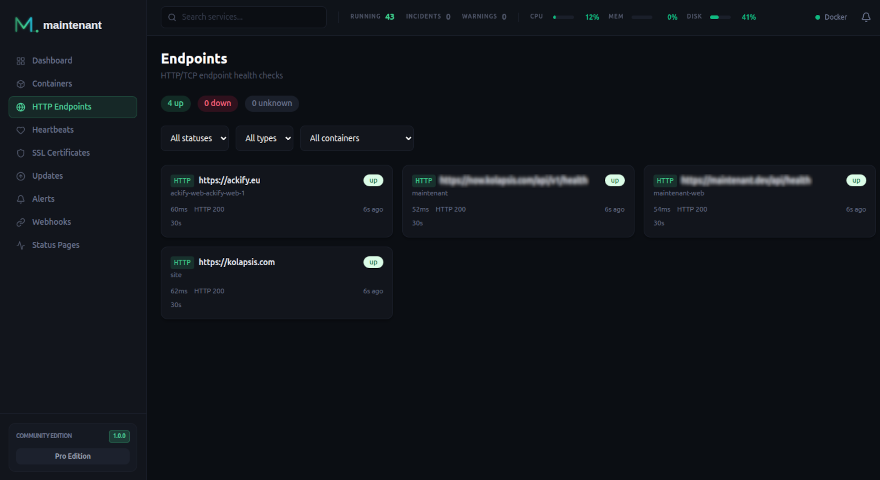
Define HTTP or TCP checks directly as Docker labels: no config files, no UI clicks. maintenant picks them up automatically when a container starts. Checks for targets that do not belong to a container can be added by hand, through the UI or the API.
How It Works
maintenant reads endpoint definitions from Docker labels on your containers. When a container with endpoint labels starts, maintenant automatically begins monitoring those endpoints at the configured interval. A stopped container pauses its checks and its endpoints show unknown ("container stopped") until it starts again.
Each check records:
- Response time: how long the endpoint took to respond
- Status:
up,down,degradedorunknown, based on the HTTP status code or the TCP connection - Uptime history: daily uptime percentages and sparkline charts
An endpoint is degraded when the host answers but its TLS certificate is not trusted (see Untrusted certificates), and unknown until its first check.
When the container behind a label-discovered endpoint disappears, or the label is removed, the endpoint
is retired: checks stop and it leaves the list. Retirement happens on the
container's destroy event, and again at every startup for anything that
vanished while the instance was down.
Retired endpoints are hidden by default; the Include retired filter (include_inactive=true in the API) brings
them back so you can delete them without waiting for retention, which removes them for good 30 days after they were last seen. A
label endpoint whose container is still running cannot be deleted: the next
discovery pass would recreate it. Remove the label, or the container.
Quick Start
Add labels to any container in your docker-compose.yml:
services:
  api:
    image: myapp:latest
    labels:
      maintenant.endpoint.http: "http://api:3000/health"
      maintenant.endpoint.interval: "15s"
That is it. maintenant starts checking http://api:3000/health every 15 seconds as soon as the container starts.
HTTP Checks
HTTP checks send a request to the configured URL and validate the response status code. The URL needs an http:// or https:// scheme and a host.
Configuration Options
| Label | Default | Description |
|---|---|---|
maintenant.endpoint.http |
none | URL to check (required for HTTP) |
maintenant.endpoint.http.method |
GET |
HTTP method: GET or HEAD. Any other value is ignored with a warning and the check uses GET |
maintenant.endpoint.http.expected-status |
2xx |
Accepted status codes, comma-separated. Each entry is an exact code (200,201) or a range (2xx,301) |
maintenant.endpoint.http.tls-verify |
true |
Verify TLS certificates. Set to false for self-signed certs. |
maintenant.endpoint.http.headers |
none | Request headers, as a JSON object or as Name=value,Name2=value2. Authorization, Cookie and Proxy-Authorization are ignored with a warning |
maintenant.endpoint.http.max-redirects |
5 |
Redirects to follow. Past the limit, the last response is judged against expected-status |
maintenant.endpoint.interval |
30s |
Check interval (Go duration format), at least 5s: a shorter value is raised to 5 seconds and a warning is logged |
maintenant.endpoint.timeout |
10s |
Request timeout. A value above the interval is lowered to the interval |
maintenant.endpoint.failure-threshold |
3 |
Consecutive failures before the consecutive_failure alert is raised |
maintenant.endpoint.recovery-threshold |
2 |
Consecutive successes before that alert is resolved |
A value that cannot be parsed is ignored and the default applies; a malformed target is skipped and reported on the endpoint.config_error event.
TCP Checks
TCP checks attempt to establish a connection to the configured host and port. The target is host:port, with a port from 1 to 65535.
Useful for databases, caches, and services that do not expose HTTP endpoints.
Multiple Endpoints per Container
Use indexed labels to monitor multiple endpoints from a single container:
labels:
  # First endpoint: HTTP health check
  maintenant.endpoint.0.http: "https://app:8443/health"
  maintenant.endpoint.0.interval: "15s"
  maintenant.endpoint.0.failure-threshold: "3"

  # Second endpoint: Redis TCP check
  maintenant.endpoint.1.tcp: "redis:6379"
  maintenant.endpoint.1.interval: "30s"
Labels without an index (maintenant.endpoint.interval) apply to every endpoint of the container, and an indexed label overrides them for its endpoint.
Indexed vs simple labels
You can use either simple labels (maintenant.endpoint.http) for a single endpoint
or indexed labels (maintenant.endpoint.0.http, maintenant.endpoint.1.tcp) for multiple
endpoints. Do not mix both styles on the same container: a simple target takes the place of index 0.
Status, Failure and Recovery Thresholds
The status of an endpoint follows the last check: it turns down at the first failed check and back to up at the first successful one.
The thresholds do not delay that status. They control the alert, which prevents pages for transient network issues:
labels:
  maintenant.endpoint.http: "https://api:3000/health"
  maintenant.endpoint.failure-threshold: "3"   # 3 consecutive failures = alert (default)
  maintenant.endpoint.recovery-threshold: "2"  # 2 consecutive successes = resolved (default)
- failure-threshold: number of consecutive failures before a Critical
consecutive_failurealert is raised. - recovery-threshold: number of consecutive successes before that alert is resolved.
A degraded result counts as a success for both thresholds and for uptime. It raises its own certificate_untrusted alert at Warning severity.
An endpoint the server probes but has not checked for more than three intervals is shown as stale ("Not checked recently") instead of its last status. This is display only and raises no alert.
Uptime History and Sparklines
maintenant records every check result and computes:
- Uptime percentages: 1 hour, 24 hours, 7 days and 30 days, returned with
GET /api/v1/endpoints/{id} - Daily uptime: one percentage per UTC day for up to 365 days, available via
GET /api/v1/endpoints/{id}/uptime/daily?days=90(daysdefaults to 90 and is capped at 365). The interface shows 90 days. - Response time trends: visualized as sparkline charts in the dashboard
Raw check results are kept for 30 days. Each completed day is aggregated into a daily uptime that is kept for 365 days, so the long history does not depend on the raw rows.
Manual Endpoints
An endpoint does not have to come from a label. Create one from the Endpoints page or through the API, for a service on another machine or one that is not in a container:
POST /api/v1/endpoints
{
  "name": "Status page",
  "endpoint_type": "http",
  "target": "https://status.example.com/health",
  "interval": "30s",
  "timeout": "10s",
  "method": "GET",
  "headers": { "Authorization": "Bearer …" }
}
name, endpoint_type (http or tcp) and target are required. The target is validated on creation and on update, with the same rules as for labels: an HTTP target needs an http:// or https:// scheme and a host, a TCP target must be host:port with a port from 1 to 65535, otherwise the call answers 400 INVALID_INPUT. interval must be at least 5 seconds, timeout at least 1 second and no longer than the interval. Thresholds, expected status, TLS verification and redirects take their defaults (3, 2, 2xx, on, 5).
| Method | Endpoint | Description |
|---|---|---|
GET |
/api/v1/endpoints |
List endpoints (filters status, type, source, container by container name, agent_id, include_inactive) |
GET |
/api/v1/containers/{id}/endpoints |
Endpoints of one container |
POST |
/api/v1/endpoints |
Create a manual endpoint |
GET |
/api/v1/endpoints/{id} |
Endpoint details and uptime percentages |
PUT |
/api/v1/endpoints/{id} |
Update a manual endpoint (400 NOT_STANDALONE for a label endpoint) |
DELETE |
/api/v1/endpoints/{id} |
Delete an endpoint (409 ENDPOINT_LIVE for a label endpoint whose container still runs) |
GET |
/api/v1/endpoints/{id}/checks |
Check history (limit, offset, since as epoch seconds) |
POST |
/api/v1/endpoints/{id}/check |
Check now, processed like a scheduled check |
GET |
/api/v1/endpoints/{id}/uptime/daily |
Daily uptime |
Only endpoints the server probes can be checked on demand: an endpoint probed by a remote agent answers 409 AGENT_PROBED, and a second check while one is running answers 409 CHECK_IN_PROGRESS.
Community is limited to 10 manual endpoints. Endpoints created from labels are not counted, and Personal and Pro have no cap. Above the cap, creation answers 403 QUOTA_EXCEEDED.
Probes are not restricted to public addresses
A check can target a private, loopback or link-local address: that is how a container is reached by its name on the Docker network. maintenant logs a warning, once per endpoint, when a target resolves to a loopback, link-local or cloud metadata address. Since the API has no authentication of its own, keep it behind a reverse proxy (see Security).
Endpoints from reverse proxy labels
If your containers already carry Traefik or Caddy docker-proxy labels, set MAINTENANT_PROXY_LABELS=true and maintenant creates an HTTP endpoint from them, with no maintenant.endpoint.* label to write. A container gets one endpoint: when its labels route several hostnames, maintenant keeps one URL, preferring routes without an authentication middleware, then the shortest path, then HTTPS. The expected status defaults to 2xx,3xx (unless the container sets maintenant.endpoint.http.expected-status), because a protected or redirecting route answers with a redirect, and a Caddy site served with tls internal is probed without TLS verification. The HTTPS hostname of the retained route is also added to the container's certificate monitors (see TLS Certificate Monitoring). A container that declares its own endpoint target keeps full control, maintenant.proxy-labels: "false" opts a container out, and traefik.enable: "false" leaves out its Traefik routes. See Reverse proxy labels.
Containers on remote hosts
Endpoints declared on the containers of a remote agent are probed by that agent, from its own network, at the interval and timeout their labels set. The agent re-reads the labels every 30 seconds. The server never probes them, and while an agent is offline its endpoints are flagged stale. Results an agent could not deliver during an outage are replayed afterwards and feed the uptime history only.
Events
Endpoint events are broadcast on the SSE stream (GET /api/v1/containers/events), for label, manual and agent-probed endpoints alike:
| Event | Sent when | Main fields |
|---|---|---|
endpoint.discovered |
A label endpoint is found or a manual one is created | endpoint_id, container_name, endpoint_type, target |
endpoint.status_changed |
The status moves between up, down, degraded and unknown |
endpoint_id, container_name, target, previous_status, new_status, response_time_ms, http_status, error, timestamp, agent_id |
endpoint.removed |
An endpoint is retired or deleted | endpoint_id, reason (label_removed, container_destroyed, container_gone or user_deleted), and container_name except for user_deleted |
endpoint.alert |
The failure threshold is reached | endpoint_id, container_name, target, consecutive_failures, threshold, last_error, timestamp |
endpoint.recovery |
The recovery threshold is reached | endpoint_id, container_name, target, consecutive_successes, threshold, timestamp |
endpoint.config_error |
A label target is malformed | endpoint_id (always null), container_name, label_key, error, timestamp |
Webhook subscriptions receive endpoint.discovered, endpoint.status_changed and endpoint.removed under the single type endpoint.status_changed, with the payload above as data. endpoint.alert, endpoint.recovery and endpoint.config_error are not sent to webhooks: the alert itself reaches them as alert.fired and alert.resolved.
Related
- Docker Labels Reference: complete label reference
- TLS Certificate Monitoring: HTTPS endpoints probed by the server automatically get certificate monitoring
- Alert Engine: configure alerts for endpoint failures